Building No Signal using Flutter and Appwrite [Part 2]
In this part we will be continue making our app No Signal using Flutter and Appwrite. I have already explained about Appwrite and how to use the authentication feature of it.

You haven’t watched my previous blog ? Stop Reading this and get back to my [Previous BLOG]
If you have read my previous blog then…..

So Let’s get back to finish what we started
We will start with designing our create_profile.dart page. When a new user sign up then we need some basic details about him like a profile picture, name and bio.
We will be creating something like this
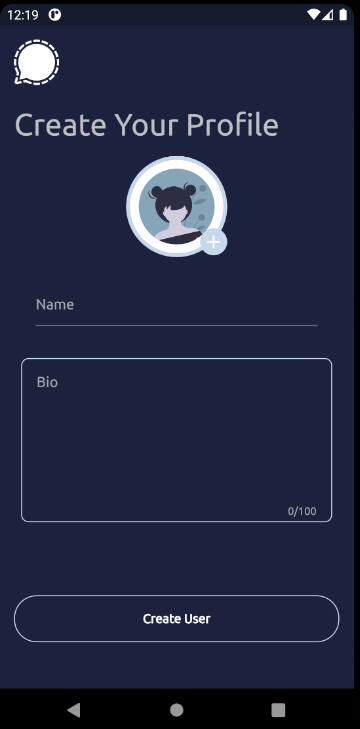
Nothing Fancy UI but this will cover how to access the Database. If you wondering about what Database they use- appwrite uses MariaDB for database storage and queries. More info about the tech-stack can be found here .
We would be using Storage API to upload a nice little profile picture of yours in the app.
We will also be doing a little bit of error handling incase things go sideways😶🌫️
To make this screen we would be importing a new package called image_picker in our pubspec.yaml. We need this package to get an image from our gallery or camera .

dependencies:
.... # More Dependencies
  image_picker: ^0.8.4
NOTE: Make sure to follow their guide on how to setup properly for your dev device. For android I had to add some lines in AndroidManifest.xml . Just read their readme file and you would be good to go.
Now let’s look at the create_profile.dart file.
import 'dart:developer';
import 'dart:io';
import 'package:flutter/material.dart';
import 'package:flutter_riverpod/flutter_riverpod.dart';
import 'package:image_picker/image_picker.dart';
import 'package:no_signal/providers/user_data.dart';
import 'package:no_signal/themes.dart';

import '../home/home_page.dart';

/// [CreateAccountPage]
/// We will be redirected to this page after a user successfully signups i.e
/// create a new account and login.
/// If a user just simply login, we will be redirected to [HomePage]
///
/// In this page, we will take some basic details like name, bio and profile pic
/// and then we will be redirected to [HomePage].

class CreateAccountPage extends ConsumerStatefulWidget {
  // For routing purposes
  static const routeName = '/create-account';
  const CreateAccountPage({Key? key}) : super(key: key);

  @override
  ConsumerState<ConsumerStatefulWidget> createState() =>
      _CreateAccountPageState();
}

class _CreateAccountPageState extends ConsumerState<CreateAccountPage> {
  //  Name Controller
  final TextEditingController _name = TextEditingController();

  //  Bio Controller
  final TextEditingController _bio = TextEditingController();

  //  Form Key to manage state and validate form
  final GlobalKey<FormState> _formKey = GlobalKey();

  final ImagePicker _picker = ImagePicker();

  XFile? _image;

  // A simple function to pick an Image from the galary
  /// We are using [ImagePicker] library 0.8.4+5
  /// Make sure to follow their installation correctly for your dev platform
  ///
  Future<void> pickImage(ImagePicker picker) async {
    final XFile? image = await _picker.pickImage(source: ImageSource.gallery);
    setState(() {
      _image = image;
    });
    log(_image!.path);
  }

  /// provider for UserData class
  late final _userData = ref.watch(userDataClassProvider);

  /// This is the main function that will be called when the user clicks on the
  /// create User Button.
  /// We will validate the form and then create a new user updating its contents
  Future<void> createUser() async {
    _isloading = true;
    if (!_formKey.currentState!.validate()) {
      _isloading = false;
      return;
    }
    _image != null
        ? await _userData.uploadProfilePicture(_image!.path, _image!.name).then(
            (imgId) => _userData.addUser(_name.text, _bio.text, imgId ?? ''))
        : _userData.addUser(_name.text, _bio.text, 'assets/images/profile.png');

    ref.watch(currentLoggedUserProvider.state).state =
        await _userData.getCurrentUser();

    await Navigator.of(context).pushReplacementNamed(HomePage.routename);
  }

  //  Show a loading spinner when submitting function
  bool _isloading = false;
  @override
  void dispose() {
    //  Always remember to dispose the controller to avoid memory leaks
    _name.dispose();
    _bio.dispose();
    super.dispose();
  }

  @override
  Widget build(BuildContext context) {
    return GestureDetector(
      onTap: () {
        if (FocusScope.of(context).hasFocus) {
          FocusScope.of(context).unfocus();
        }
      },
      child: Scaffold(
        resizeToAvoidBottomInset: false,
        body: SafeArea(
          child: Form(
              key: _formKey,
              child: Column(
                mainAxisAlignment: MainAxisAlignment.start,
                crossAxisAlignment: CrossAxisAlignment.start,
                children: [
                  Padding(
                      padding: const EdgeInsets.symmetric(
                          horizontal: 16, vertical: 16),
                      child: Image.asset(
                        'assets/images/logo.png',
                        height: 50,
                        color: Colors.white,
                      )),
                  Padding(
                    padding:
                        const EdgeInsets.symmetric(horizontal: 16, vertical: 8),
                    child: Text(
                      'Create Your Profile',
                      style: Theme.of(context)
                          .textTheme
                          .headline4
                          ?.copyWith(fontSize: 24),
                    ),
                  ),
                  Padding(
                    padding: const EdgeInsets.only(top: 10.0),
                    child: Center(
                      child: InkWell(
                        borderRadius: BorderRadius.circular(50),
                        enableFeedback: true,
                        onTap: () => pickImage(_picker),
                        child: Stack(
                          children: [
                            CircleAvatar(
                                radius: 56,
                                backgroundColor: NoSignalTheme.whiteShade1,
                                child: CircleAvatar(
                                  radius: 52,
                                  backgroundImage: _image == null
                                      ? const AssetImage(
                                              'assets/images/avatar.png')
                                          as ImageProvider<Object>
                                      : FileImage(File(_image!.path)),
                                )),
                            Positioned(
                              bottom: 2,
                              right: 0,
                              child: CircleAvatar(
                                backgroundColor: NoSignalTheme.whiteShade1,
                                radius: 15,
                                child: const Icon(
                                  Icons.add,
                                  size: 24,
                                  color: Colors.white,
                                ),
                              ),
                            ),
                          ],
                        ),
                      ),
                    ),
                  ),
                  Container(
                    margin: const EdgeInsets.symmetric(
                        horizontal: 24, vertical: 16),
                    padding:
                        const EdgeInsets.symmetric(horizontal: 16, vertical: 4),
                    child: TextFormField(
                      autocorrect: true,
                      enableSuggestions: true,
                      controller: _name,
                      keyboardType: TextInputType.emailAddress,
                      onSaved: (value) {},
                      decoration: const InputDecoration(
                        hintText: 'Name',
                        alignLabelWithHint: true,
                        // border: InputBorder.none,
                      ),
                      validator: (value) {
                        if (value!.isEmpty) {
                          return 'Pls enter your name';
                        }
                        return null;
                      },
                    ),
                  ),
                  Container(
                    margin: const EdgeInsets.symmetric(
                        horizontal: 24, vertical: 16),
                    padding:
                        const EdgeInsets.symmetric(horizontal: 16, vertical: 4),
                    decoration: BoxDecoration(
                      border: Border.all(color: NoSignalTheme.whiteShade1),
                      borderRadius: BorderRadius.circular(8),
                    ),
                    child: TextFormField(
                      autocorrect: true,
                      controller: _bio,
                      enableSuggestions: true,
                      maxLines: 7,
                      maxLength: 100,
                      keyboardType: TextInputType.emailAddress,
                      onSaved: (value) {},
                      decoration: const InputDecoration(
                        border: InputBorder.none,
                        hintText: 'Bio',
                        alignLabelWithHint: true,
                      ),
                      validator: (value) {
                        if (value!.isEmpty) {
                          return 'It must not be empty';
                        }
                        return null;
                      },
                    ),
                  ),
                  const Spacer(),
                  _isloading
                      ? const Center(child: CircularProgressIndicator())
                      : Container(
                          padding: const EdgeInsets.only(top: 48.0),
                          margin: const EdgeInsets.symmetric(horizontal: 16),
                          width: double.infinity,
                          child: MaterialButton(
                            onPressed: createUser,
                            child: const Text(
                              'Create User',
                              style: TextStyle(fontWeight: FontWeight.w600),
                            ),
                            textTheme: ButtonTextTheme.primary,
                            minWidth: 100,
                            padding: const EdgeInsets.all(18),
                            shape: RoundedRectangleBorder(
                              borderRadius: BorderRadius.circular(25),
                              side:
                                  BorderSide(color: NoSignalTheme.whiteShade1),
                            ),
                          ),
                        ),
                  const Spacer(
                    flex: 3,
                  ),
                ],
              )),
        ),
      ),
    );
  }
}
Now here there are lot of functions and providers which you aren’t aware of yet. let’s Discuss about them and implement along with it.
PS: I am bad at naming variables so please spare me here😅
I have created a new class UserData which manages all the functions related to user. For e.g. I want to add a new user, update the user details, fetch users data etc, all the related functions combined in a single class.
Let’s look at the code :-
user_data.dart
import 'dart:developer';
import 'dart:typed_data';

import 'package:appwrite/appwrite.dart';
import 'package:appwrite/models.dart';
import 'package:no_signal/models/user.dart';

/// [UserData] class
/// This class is used to handle the user data
/// All the related methods to users are here
/// Say Add Profile Picture, Update Profile, Add User, Update User, Delete User etc
///
class UserData {
  // We will be getting the instance of client through a provider
  final Client client;

  //  Database object to connect with the database and perform CRUD operations
  late Database database;

  // Storage object to connect with the storage to upload profile picture
  late Storage storage;

  // Account object to connect with the account to get the unique user id
  // also to update some details of the user
  late Account account;

  // Initialize the class with the client
  UserData(this.client) {
    account = Account(client);
    storage = Storage(client);
    database = Database(client);
  }

  /// [uploadProfilePicture]
  /// This method is used to add profile picture to the user
  /// It takes the filepath of the image and the imgName as parameters
  /// After successful upload of the image it returns the unique id of the image
  /// Also we are free to choose the fileId of the image
  /// But here we don't need for that
  ///
  ///
  Future<String?> uploadProfilePicture(String filePath, String imgName) async {
    try {
      User res = await account.get();
      File? result = await storage.createFile(
        file: await MultipartFile.fromPath('file', filePath, filename: imgName),
        fileId: 'unique()',
        read: ['role:all', 'user:${res.$id}'],
        // Make sure to give [role:all]
        // So that every authenticated user can access it
        // If you don't give any read permissions, by default the sole user
        // can access it.
        // We are keeping write function blank. It by defaults gives write permissions
        // to the user only and that's what we only want.
      );
      return result.$id;
    } catch (e) {
      log('$e');
      rethrow;
    }
  }

  /// [addUser]
  /// This method is used to add a new user to the database when you signup
  /// It takes all the things which you are supposed to fill in the [CreateAccountPage]
  /// It returns void as we don't want anything to be returned
  Future<void> addUser(String name, String bio, String imgId) async {
    // Get the details about the current logged in user
    User res = await account.get();

    try {
      //  We will be updating his name in the Users Api
      await account.updateName(name: name);
      // Additional data of the user will be written in the collection
      await database
          .createDocument(collectionId: 'users', documentId: res.$id, data: {
        'name': name,
        'bio': bio,
        'imgId': imgId,
        'email': res.email,
        'id': res.$id,
      }, read: [
        'role:all',
        'user:${res.$id}'
      ]);
    } catch (_) {
      rethrow;
    }
  }

  /// [getCurrentUser]
  /// This method is used to get the current user details
  /// It returns the [NoSignalUser] object which contains all the details of the user
  ///  We will use this object to display the user details in the [HomePage] and [SettingsPage]
  Future<NoSignalUser?> getCurrentUser() async {
    try {
      final user = await account.get();
      final data = await database.getDocument(
          collectionId: 'users', documentId: user.$id);
      final img = await _getProfilePicture(data.data['imgId']);
      return NoSignalUser.fromMap(data.data).copyWith(image: img);
    } catch (_) {
      rethrow;
    }
  }

  /// [getUsersList]
  /// A function which returns the list of current users in the database
  /// These are those users who are currently registered in our app
  Future<List<NoSignalUser>> getUsersList() async {
    try {
      final response = await database.listDocuments(collectionId: 'users');
      final List<NoSignalUser> users = [];
      final temp = response.documents;
      // If the list is empty, return an empty list
      if (temp.isEmpty) {
        return users;
      }
      // For loop for converting the data to our [NoSignalUser] object
      for (var element in temp) {
        final memImage =
            await _getProfilePicture(element.data['imgId'] as String);
        users.add(NoSignalUser.fromMap(element.data).copyWith(image: memImage));
      }
      return users;
    } on AppwriteException {
      rethrow;
    }
  }

  /// [_getProfilePicture]
  /// This method is used to get the profile picture of the user
  /// It takes the unique id of the image as a parameter
  /// It returns the image in the form of a [Uint8List]
  ///
  /// This is a private function and would hardly be used outside this class
  Future<Uint8List> _getProfilePicture(String fileId) async {
    try {
      final data = await storage.getFilePreview(fileId: fileId);
      return data;
    } on AppwriteException {
      rethrow;
    }
  }
}
To know more about Storage Account Database APIs — all their methods, what response it gives etc, see the following:
Account
Database
Storage
Let’s also define NoSignalUser class. It’s basically all the relevant info of an user needed inside the No Signal app.
user.dart
import 'dart:typed_data';

/// [NoSignalUser]
///  A normal user model containing all the neccessary data to be used in the app
/// This model will contains as described below
class NoSignalUser {
  final String id;
  final String name;
  final String email;
  final String? bio;
  final Uint8List? image;
  final String? imgId;
  NoSignalUser({
    required this.id,
    required this.name,
    required this.email,
    this.bio,
    this.image,
    this.imgId,
  });

  NoSignalUser copyWith({
    String? id,
    String? name,
    String? email,
    String? bio,
    Uint8List? image,
    String? imgId,
  }) {
    return NoSignalUser(
      id: id ?? this.id,
      name: name ?? this.name,
      email: email ?? this.email,
      bio: bio ?? this.bio,
      image: image ?? this.image,
      imgId: imgId ?? this.imgId,
    );
  }

  Map<String, dynamic> toMap() {
    return {
      'id': id,
      'name': name,
      'email': email,
      'bio': bio,
      'imgId': imgId,
    };
  }

  factory NoSignalUser.fromMap(Map<String, dynamic> map) {
    return NoSignalUser(
      id: map['id'],
      name: map['name'],
      email: map['email'],
      bio: map['bio'],
      imgId: map['imgId'],
    );
  }

  @override
  bool operator ==(Object other) {
    if (identical(this, other)) return true;

    return other is NoSignalUser &&
        other.id == id &&
        other.name == name &&
        other.email == email &&
        other.bio == bio &&
        other.image == image &&
        other.imgId == imgId;
  }

  @override
  int get hashCode {
    return id.hashCode ^
        name.hashCode ^
        email.hashCode ^
        bio.hashCode ^
        image.hashCode ^
        imgId.hashCode;
  }
}
Now its time to create some providers for it.
create a new file user_data.dart and we will store all the providers related to user function there.
import 'package:flutter_riverpod/flutter_riverpod.dart';
import 'package:no_signal/models/user.dart';
import 'package:no_signal/providers/client.dart';

import '../api/database/user_data.dart';

/// Provider for the [UserData] class.
/// This provider is used to access all the [UserData] methods.
///
///
final userDataClassProvider = Provider<UserData>((ref) {
  return UserData(ref.watch(clientProvider));
});

/// Provider for the [UserData] class.
/// This provider is used to get the List of  all the [User] from the database.
/// Since this invloves a Future, a FutureProvider is used.
final usersListProvider = FutureProvider<List<NoSignalUser>>((ref) {
  return ref.watch(userDataClassProvider).getUsersList();
});

/// State Provider for the Current LoggedIn user. This would be used to access
/// any of its data from anywhere in the app. That's the power of StateProvider.
final currentLoggedUserProvider = StateProvider<NoSignalUser?>((ref) {
  return null;
});
We will discuss about usersListProvider and getUsersList later.
So Looks like we are pretty done, Right?
NOT YET!!!

We haven’t created a collection and defined the attributes of it in the Appwrite Dashboard. Let’s see how to create one
STEP 1
Click on Database
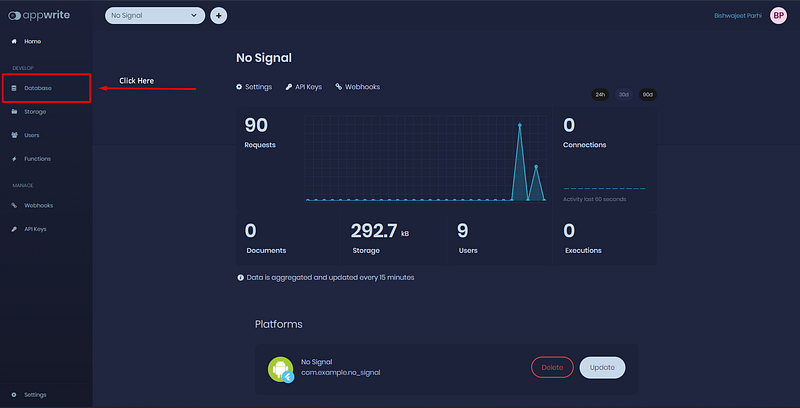
Appwrite Dashboard
STEP 2
Click on Add Collection
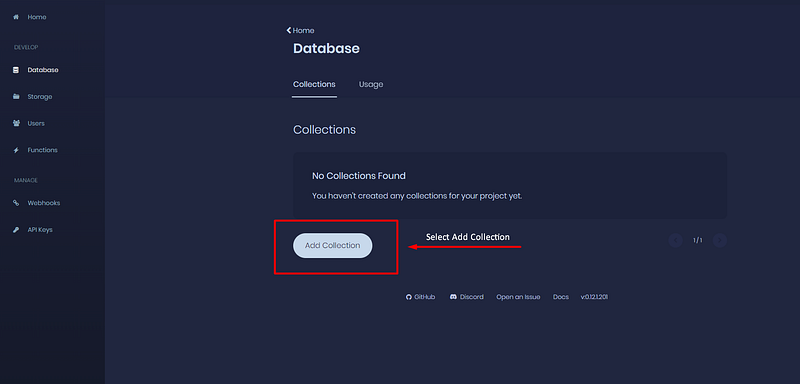
Appwrite Database Page
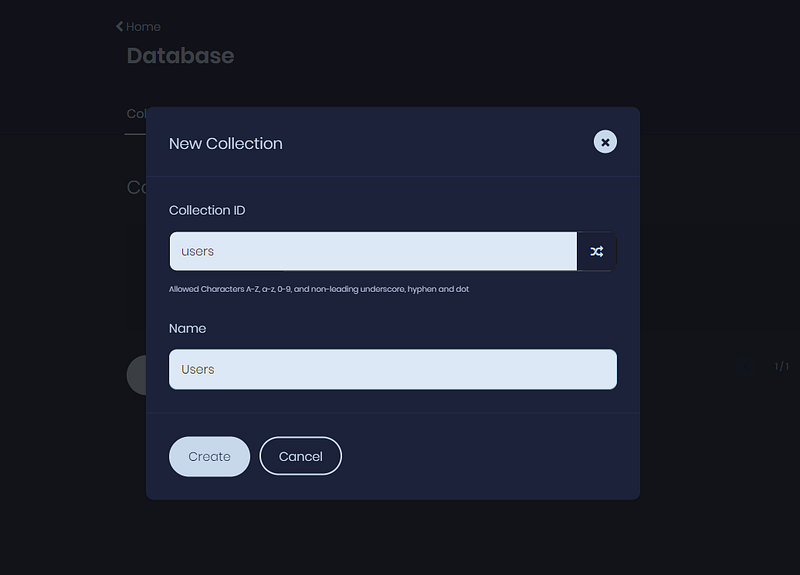
STEP 3
Set a Collection ID and give a collection name to it. Setting a custom collection id is purely optional but it would be better if we give a custom id to it for easier understanding. Ofc, you are free to choose your own name and id here.
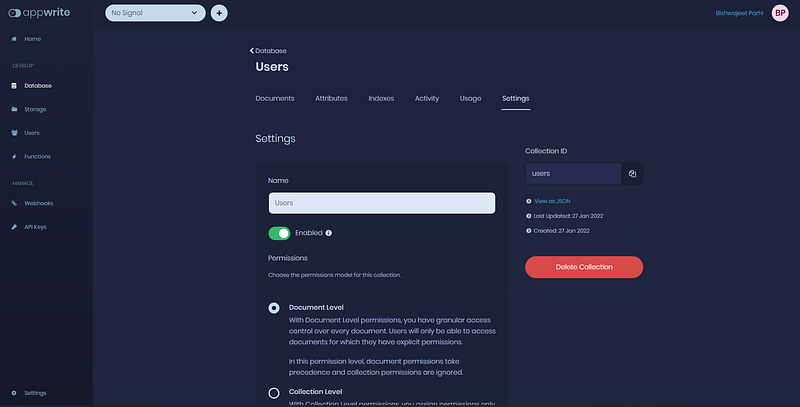
And this is something you should get after creating it.
Now, Let’s head over to Attribute tab to add some attributes to design how our document should actually look like.
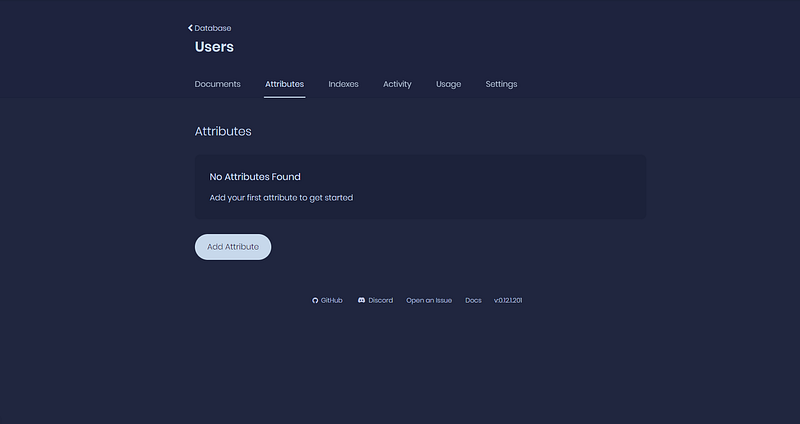
Database
Click on Add Attribute and add the following attributes
{
"name": Name, // A String
"bio": Bio, // String
"imgId": imgId, //String
"email": Email, // Email
"id": id //String
}
After adding them it should look something like this…..
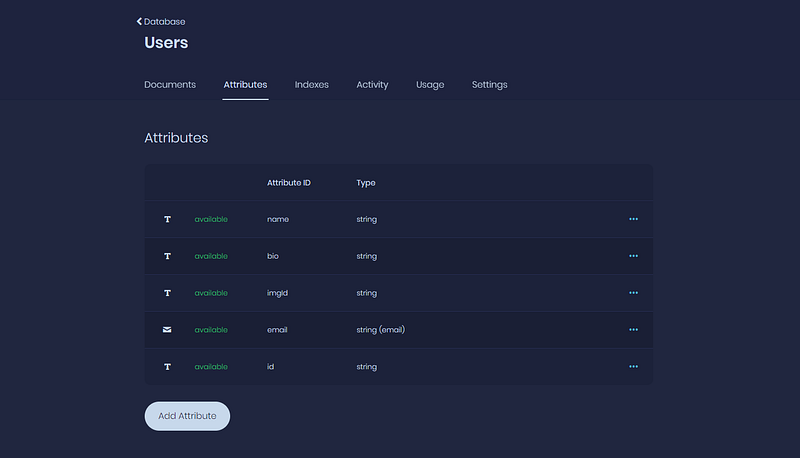
Let’s test things out now and see if it works or not
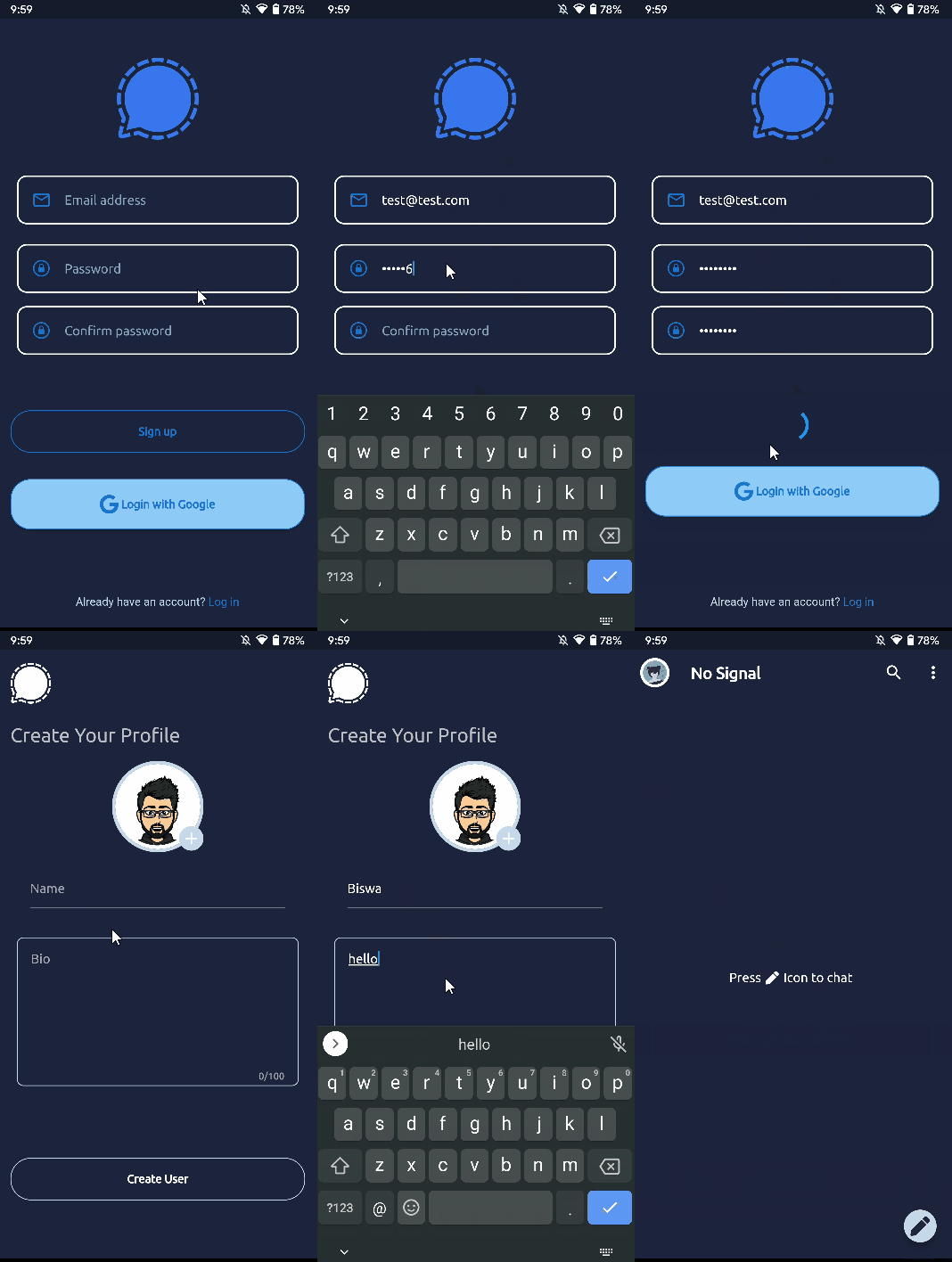
Live Demo of Create Profile
Voila🎉🎉🎉
It works. Let’s see how things look at the appwrite dashboard
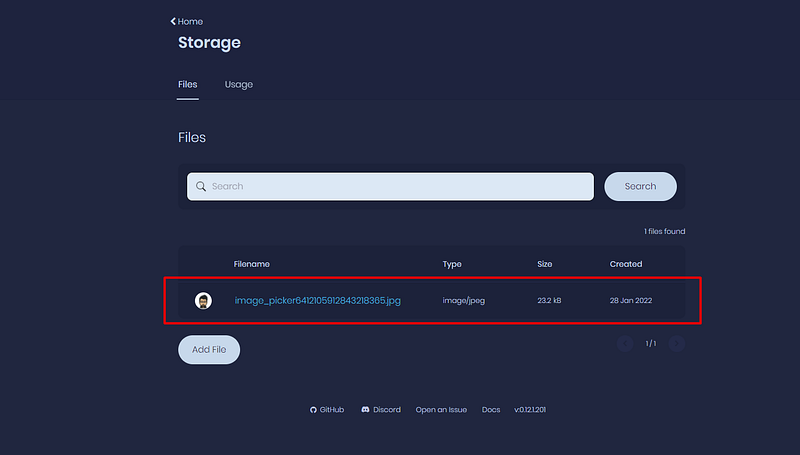
STORAGE API
We could see an image and it looks like the one we uploaded as our profile picture.
Let’s check the permissions
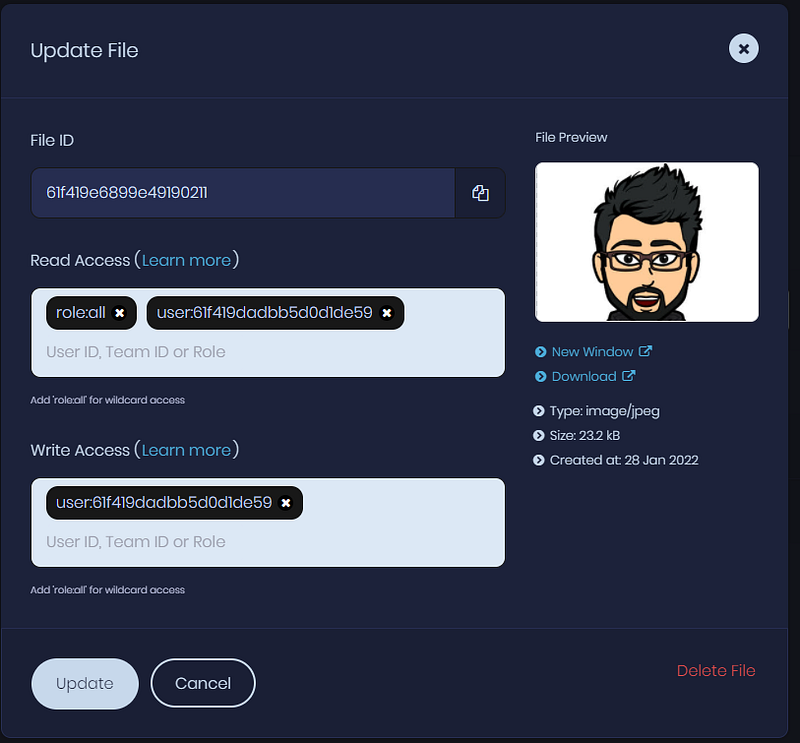
Image permissions
PERFECT ✨
Our functions for Storage API are working perfectly as expected.
Let’s look at Users now
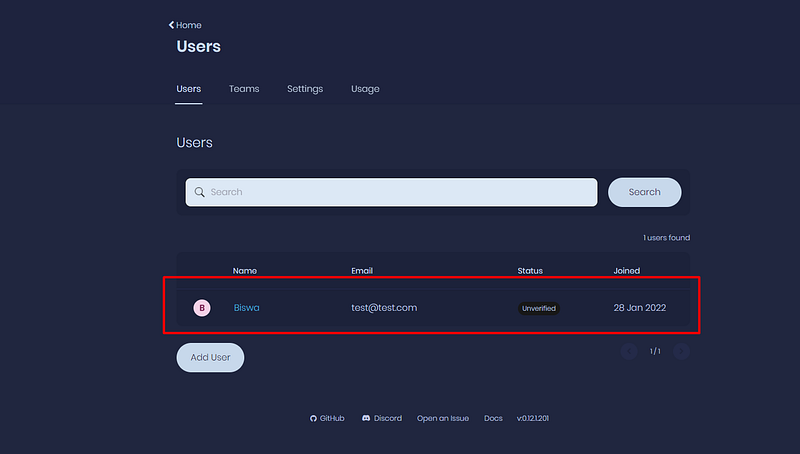
Users API
And Lastly at the Users Collection in Database Tab
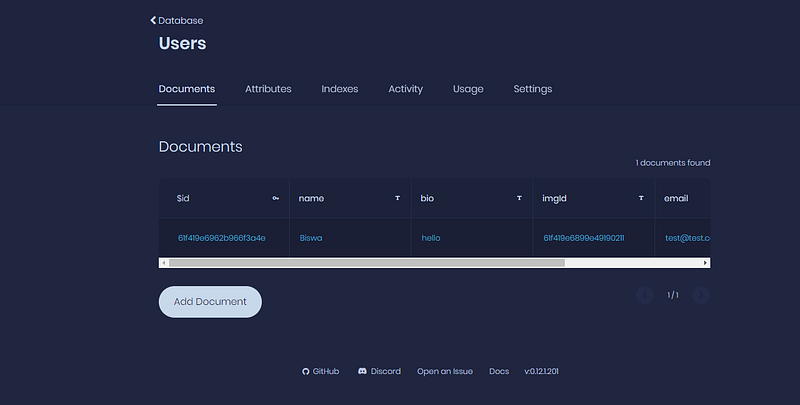
Users Collection

Happy Penguin GIF
Everything is working and has been validated in the dashboard too🥳.
But WAIT!!!!

We are redirected to home_page.dart but I haven’t showed you the modified code yet.
Let’s look at it
import 'package:flutter/material.dart';
import 'package:flutter_riverpod/flutter_riverpod.dart';
import 'package:font_awesome_flutter/font_awesome_flutter.dart';
import 'package:no_signal/pages/home/users_list_page.dart';
import 'package:no_signal/providers/auth.dart';
import 'package:no_signal/providers/chat.dart';
import 'package:no_signal/providers/user_data.dart';
import 'package:no_signal/themes.dart';

import '../../widgets/chat_tile.dart';
import '../settings/settings.dart';

// PopupItems
enum PopupItem {
  GROUP,
  SETTINGS,
  LOGOUT,
}

class HomePage extends ConsumerWidget {
  static const routename = '/home';
  const HomePage({Key? key}) : super(key: key);

  @override
  Widget build(BuildContext context, WidgetRef ref) {
    // Authentication variable to implement logout functionality
    final auth = ref.watch(authProvider);

    /// Get the current loggedIn User
    final currUser = ref.watch(currentLoggedUserProvider);

    //  This time I decided to work with [SLIVERS] instead of [LIST]
    return Scaffold(
      body: CustomScrollView(
        shrinkWrap: true,
        slivers: <Widget>[
          SliverAppBar(
            title: const Text(
              'No Signal',
              style: TextStyle(fontWeight: FontWeight.bold),
            ),
            leading: Padding(
              padding: const EdgeInsets.all(10.0),
              child: InkWell(
                onTap: () {
                  // Open Settings screen
                  Navigator.of(context).pushNamed(SettingsScreen.routename);
                },
                child: CircleAvatar(
                  backgroundImage: currUser?.image != null
                      ? MemoryImage(currUser!.image!) as ImageProvider
                      : const AssetImage('assets/images/avatar.png'),
                ),
              ),
            ),
            actions: [
              IconButton(
                icon: const Icon(Icons.search),
                onPressed: () {},
              ),
              PopupMenuButton(
                  onSelected: (PopupItem item) {
                    switch (item) {
                      case PopupItem.GROUP:
                        ScaffoldMessenger.of(context)
                            .showSnackBar(const SnackBar(
                          content: Text('Wait '),
                          // Will Implement later
                        ));
                        break;
                      case PopupItem.SETTINGS:
                        // Open settings screen
                        Navigator.of(context)
                            .pushNamed(SettingsScreen.routename);
                        break;
                      case PopupItem.LOGOUT:
                        auth.logout(context);

                        break;
                    }
                  },
                  itemBuilder: (context) => <PopupMenuEntry<PopupItem>>[
                        const PopupMenuItem<PopupItem>(
                          value: PopupItem.GROUP,
                          child: Text('New group'),
                        ),
                        const PopupMenuItem<PopupItem>(
                          value: PopupItem.SETTINGS,
                          child: Text('Settings'),
                        ),
                        const PopupMenuItem<PopupItem>(
                          value: PopupItem.LOGOUT,
                          child: Text('Logout'),
                        ),
                      ])
            ],
          ),
          // We will implement more logic later
          ///  Currently we are using cause the Home Page has no chat list
         SliverFillRemaining(
                  hasScrollBody: false,
                  child: Center(
                    child: RichText(
                      text: TextSpan(
                          style: Theme.of(context).textTheme.subtitle1,
                          children: const [
                            TextSpan(
                              text: 'Press ',
                            ),
                            WidgetSpan(
                                child: Padding(
                              padding: EdgeInsets.symmetric(horizontal: 2.0),
                              child: FaIcon(
                                FontAwesomeIcons.pen,
                                size: 16,
                              ),
                            )),
                            TextSpan(
                              text: ' Icon to chat ',
                            ),
                          ]),
                    ),
                  ),
                )
        ],
      ),
      floatingActionButton: FloatingActionButton(
        onPressed: () {
          Navigator.of(context).pushNamed(UsersListPage.routeName);
        },
        backgroundColor: NoSignalTheme.whiteShade1,
        mini: true,
        child: FaIcon(
          FontAwesomeIcons.pen,
          color: NoSignalTheme.navyblueshade4,
        ),
      ),
    );
  }
}
We need to also make some changes in the _init function in the main.dart file too. Let’s look at that too
Future<void> _init(WidgetRef ref) async {
    //  This is how you can access providers in stateful widgets
    final user = await ref.read(userProvider.future);
    if (user != null) {
      //  This is how you can modify the state of the providers
      // **Note:** This would be called only when user was already logged in.
      final userData = await ref.read(userDataClassProvider).getCurrentUser();
      ref
          .read(currentLoggedUserProvider.state)
          .update((user) => user = userData);

      ref.read(userLoggedInProvider.state).state = true;
    } else {
      ref.read(userLoggedInProvider.state).state = false;
    }
  }
Replace the _init function with the above one. Let’s see what’s changed. At first it fetches the current session. If the user is Logged In, it will return the User model which we later need to update to NoSignalUser model. Then we change userLoggedInProvider state to true.
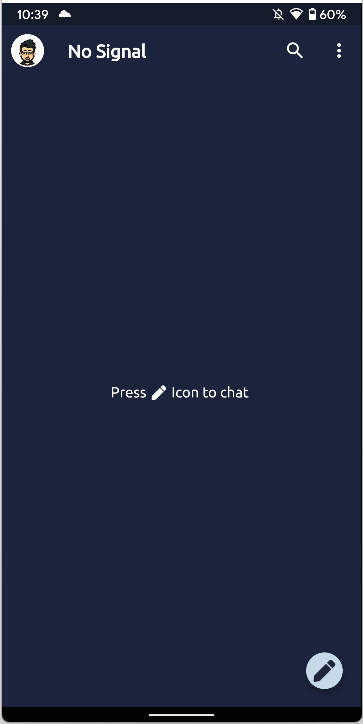
And that’s how we get a nice little profile picture in the App Bar.
Let’s code Users List Page
import 'dart:typed_data';

import 'package:flutter/material.dart';
import 'package:flutter_riverpod/flutter_riverpod.dart';
import 'package:no_signal/models/user.dart';
import 'package:no_signal/pages/chat/chat_page.dart';
import 'package:no_signal/providers/server.dart';
import 'package:no_signal/providers/user_data.dart';

/// [UsersListPage]
///
/// This page is used to display a list of users who are using our app
class UsersListPage extends ConsumerWidget {
  static const String routeName = '/usersListPage';
  const UsersListPage({Key? key}) : super(key: key);

  ListTile usersTile(
      {required String name,
      String? bio,
      required Uint8List imageUrl,
      VoidCallback? onTap}) {
    return ListTile(
      leading: CircleAvatar(
        backgroundImage: MemoryImage(imageUrl),
      ),
      title: Text(name),
      subtitle: Text(bio ?? ''),
      onTap: onTap ?? () {},
    );
  }

  @override
  Widget build(BuildContext context, WidgetRef ref) {
    List<ListTile> _users = [];

    /// Get the list of users from the server
    final users = ref.watch(usersListProvider).asData?.value;

    /// Get the current user
    final curUser = ref.watch(currentLoggedUserProvider);

    /// Sort the users in alphabetical order
    users?.sort((a, b) => a.name.compareTo(b.name));

    /// Adding the users in the list then
    users?.forEach((user) async {
      if (curUser!.id != user.id) {
        _users.add(usersTile(
            name: user.name,
            bio: user.bio,
            imageUrl: user.image as Uint8List,
            onTap: () {}));
      }
    });
    return Scaffold(
      appBar: AppBar(
        elevation: 0,
        title: const Text('Users'),
        centerTitle: true,
      ),
      body: ListView(
        physics: const BouncingScrollPhysics(),
        children: _users,
      ),
    );
  }
}
I have already added some dummy data in the server side itself. Let’s see how it looks
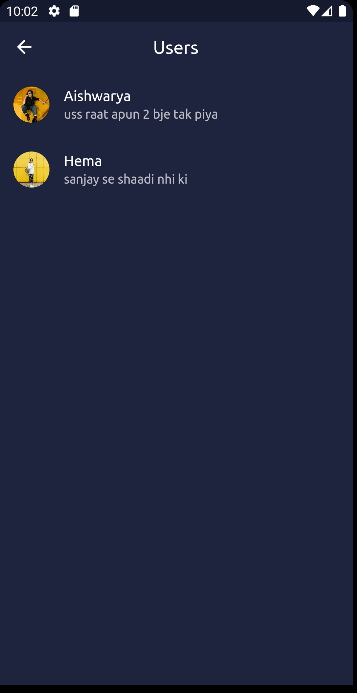
Let’s end this blog here.
Glad that you made it here till the end. In the next blog, I believe we would finally be working in the chat functionality, managing state and following the best practices hopefully✨
If you have any doubts or want to share some feedback in private, here’s my all my active handles in one link 😉.

EDIT:
Checkout Part 3 here